

Turn Real-World
Welding Training into Data
Turn Real-World
Welding Training
into Data
Turn Real-World
Welding Training into Data
WTS(Welding Training Solution) connects
welding sessions, feedback, and performance data.
WTS(Welding Training Solution) connects welding sessions, feedback, and performance data.
WTS(Welding Training Solution) connects
welding sessions, feedback, and performance data.
WTS Captures What Training Misses
WTS Captures What Training Misses
WTS Captures
What Training Misses
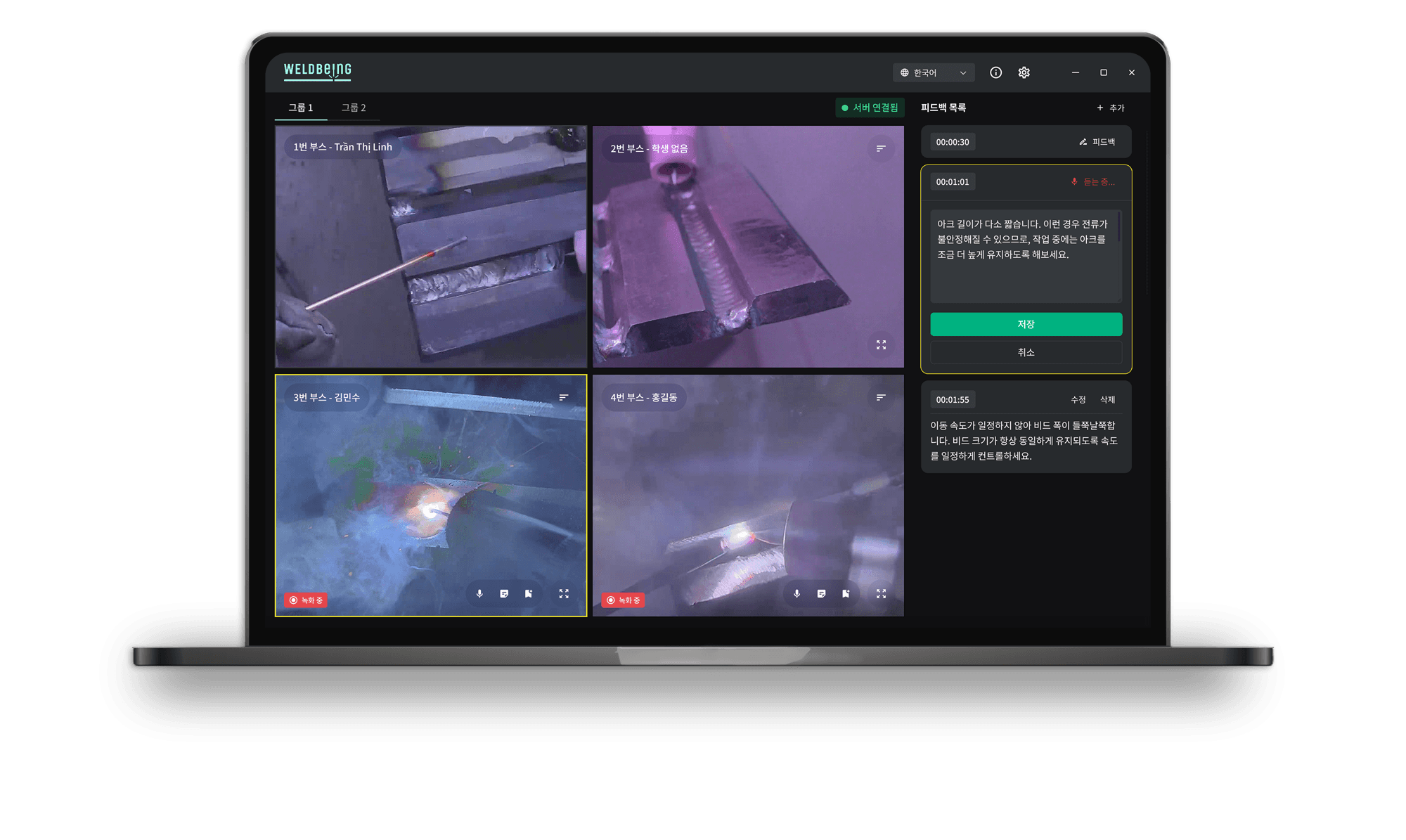
In real-world training environments, multiple trainees weld at the same time. Instructors cannot realistically observe and document every detail—from posture and torch movement to final weld quality. WTS captures the entire process, linking training sessions, feedback, and progress data in one structured system.
In real-world training environments, multiple trainees weld at the same time. Instructors cannot realistically observe and document every detail—from posture and torch movement to final weld quality. WTS captures the entire process, linking training sessions, feedback, and progress data in one structured system.
In real-world training environments, multiple trainees weld at the same time. Instructors cannot realistically observe and document every detail—from posture and torch movement to final weld quality. WTS captures the entire process, linking training sessions, feedback, and progress data in one structured system.
Training Visibility
Monitor multiple trainees’ live welding sessions
on a single screen.
Monitor multiple trainees’ live welding sessions
on a single screen.
Training Record Management
Organize each trainee’s training videos, feedback,
and past reports.
Organize each trainee’s training videos, feedback,
and past reports.
More Actionable Feedback
Give specific, evidence-based feedback using each trainee’s welding footage.
Give specific, evidence-based feedback using each trainee’s welding footage.
Skill Progress Tracking
Track each trainee’s improvement through repeated practice sessions.
Track each trainee’s improvement through repeated practice sessions.
Core WTS Features
Core WTS Features
Core WTS Features
From training and feedback to reporting, every step is connected in one continuous data flow.
From training and feedback to reporting, every step is connected in one continuous data flow.
Multi-Trainee Monitoring
Multi-Trainee Monitoring
Monitor multiple trainees’ welding sessions in real time.
Monitor multiple trainees’ welding sessions in real time.
Helmet-Camera Welding Footage
Helmet-Camera Welding Footage
Capture real welding footage with helmet-mounted cameras and use it for post-training review.
Capture real welding footage with
helmet-mounted cameras and use it for post-training review.
Capture real welding footage with helmet-mounted cameras
and use it for post-training review.
Instructor Feedback
Instructor Feedback
Link and manage instructor voice notes and comments within each trainee’s training record.
Link and manage instructor voice notes and comments within each trainee’s training record.
Link and manage instructor voice notes and comments
within each trainee’s training record.
Training Report
Training Report
Turn training history and review data into structured reports for easier program management.
Turn training history and review data into structured reports for easier program management.
Turn training history and review data into structured
reports for easier program management.
Multilingual Feedback Support
Multilingual Feedback Support
Use built-in translation to share feedback and comments clearly with international trainees.
Use built-in translation to share feedback and comments clearly with international trainees.
Use built-in translation to share feedback and comments
clearly with international trainees.
Multi-Trainee Monitoring
Monitor multiple trainees’ welding sessions in real time.
Helmet-Camera Welding Footage
Capture real welding footage with helmet-mounted cameras and use it for post-training review.
Instructor Feedback
Link and manage instructor voice notes and comments within each trainee’s training record.
Training Report
Turn training history and review data into structured reports for easier program management.
Multilingual Feedback Support
Manage instructor feedback and comments with built-in translation support to communicate more easily with international trainees.
Welding Footage
Welding Footage
Trainee Profiles
Trainee Profiles
Training Session History
Training Session History
Instructor Feedback
Instructor Feedback
Voice Notes & Comments (Automatic Translation)
Voice Notes & Comments
(Automatic Translation)
Training Reports
Training Reports
Welding Process Data (Optional)
Welding Process Data
(Optional)
Bead Review Data (Planned)
Bead Review Data
(Planned)
Every Moment of Training Becomes Data
Every Moment of
Training Becomes Data
Every Moment of
Training Becomes Data
From Training to Reports: One Connected WTS Workflow
From Training to Reports: One Connected WTS Workflow
01
Create a Class & Register Trainees
Create a Class & Register Trainees
02
Conduct Hands-on Welding Practice
Conduct Hands-on Welding Practice
03
Monitor & Give Feedback in Real Time
Monitor & Give Feedback in Real Time
04
(Self-guided in the Trainee App)
Generate Reports
Generate Reports
05
Manage Training History & Skill Progress
Manage Training History & Skill Progress
Continuous Growth & Improvement
System Configuration
System Configuration
The base WTS package includes two welding helmets and the monitoring dashboard app.
It can scale to support multiple trainees based on the size of your training facility.
The base WTS package includes two welding helmets and the monitoring dashboard app.
It can scale to support multiple trainees based on the size of your training facility.
The base WTS package includes two welding helmets
and the monitoring dashboard app.
It can scale to support multiple trainees based on the size of your training facility.
Welding Helmets

Edge Server

Wired/Wireless
Network

Wireless
Wireless
Main Server

LLM
AI
Video & System Data,
User Information & Class Info
Video & System Data,
User Information &
Class Info

Wired
Wireless

Instructor Monitoring Dashboard (Windows) &
Trainee App (Android and iOS) & PDF Reports


Instructor Monitoring Dashboard
(Windows)
Trainee App (Android and iOS)
& PDF Reports
Welding Helmets
Edge Server
Main Server
Wired/Wireless Network
LLM
Wireless
Wireless
Wired
Wireless
Video & System Data,
User Information & Class Info
AI
AI

*Welding process data, such as current and voltage, can be integrated as an option based on your requirements and equipment setup.
*Welding process data, such as current and voltage, can be integrated as an option based on your requirements and equipment setup.
*Welding process data, such as current and voltage, can be integrated as an option based on your requirements and equipment setup.
Where WTS Works Best
Where WTS Works Best
Welding Schools & Training Institutes
Manage hands-on welding sessions for multiple trainees.
Manage hands-on welding sessions
for multiple trainees.

Corporate Training Centers
Maintain structured training records for new hires and contractor welders.
Welder Skill Assessment Programs
Use training data to verify job readiness and track progress over repeated session.
WTS Deployment Process
WTS Deployment Process
[Step 1]
Assess the Training Environment
Assess the Training Environment
Assess the Training Environment
[Step 2]
Configure Helmet Cameras
& Network
Configure Helmet Cameras
& Network
Configure Helmet Cameras
& Network
[Step 3]
Install Servers
& Monitoring PCs
Install Servers
& Monitoring PCs
[Step 4]
Set Up Instructor Accounts & Register Trainees
Set Up Instructor Accounts
& Register Trainees
[Step 5]
Run a Pilot Class
Run a Pilot Class
[Step 6]
Roll Out to the Full Training Program
Roll Out to the Full Training Program
Business Registration Number 493-81-02515
CEO Sungwon Heo
Address 5th Floor, 13 Nonhyeon-ro 85-gil, Gangnam-gu, Seoul
Inquiries support@weldbeing.ai
Company
© 2026 ONJ. All rights reserved.
Business Registration Number 493-81-02515
Address 5th Floor, 13 Nonhyeon-ro 85-gil,
Gangnam-gu, Seoul
Inquiries support@weldbeing.ai
CEO Sungwon Heo
Company
© 2026 ONJ. All rights reserved.
Business Registration Number 493-81-02515
Address 5th Floor, 13 Nonhyeon-ro 85-gil,
Gangnam-gu, Seoul
Inquiries support@weldbeing.ai
CEO Sungwon Heo
Company
© 2026 ONJ. All rights reserved.